

Dunder Quest
A platformer where every stage teaches you a piece of Python.
Guide a pebble across six stages to the kiln. Read the lore scrolls on the way, and use real code to open the path through each stage. Then duel the wizard at the exit: jump into the block with the right answer while you dodge his spells.
Keyboard, gamepad or touch. On a phone, turn it sideways and use the on-screen buttons.
The trail
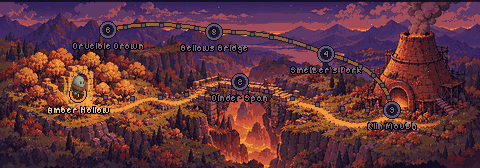
Six stages, six lessons
Each stop on the map is a Python topic, and they build on each other: lists first, comprehensions last. Pick a stage to read its lesson and practice its trial here on the site.
Inside a stage
Learn it, use it, prove it
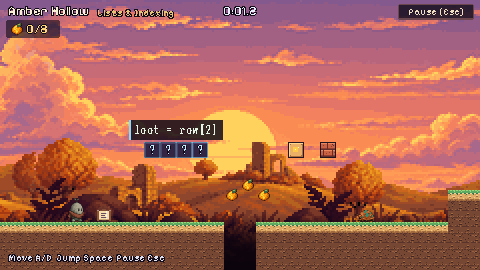
Read the scrolls
Lore scrolls lie along the route. Touch one and it opens a card with a few lines of code and the idea behind them. Every scroll you read goes into your Spellbook.
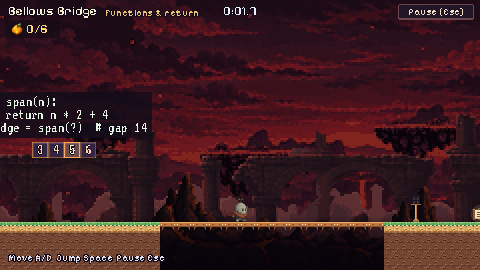
Code the way forward
The only way through each stage is a gadget that runs real Python. You slice planks into a bridge, store keys in hash buckets, load a loop into a lift, or call the function that builds a bridge the exact length of the gap. Only the right code gets you across.
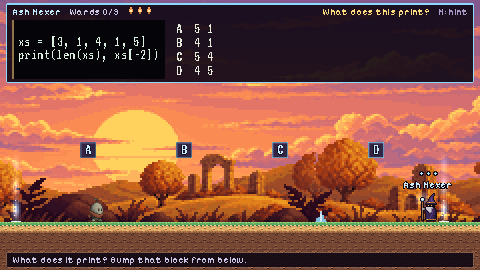
Duel the wizard
A wizard holds every exit. His question shows at the top of the screen, and you answer by jumping into the lettered block while you dodge his spells. Each right answer breaks a ward. A wrong one gets you zapped and a new question. He'll give you a hint if you ask.
28 lore scrolls · 63 trial questions · every snippet checked against real Python
Download
Play without a browser
The desktop builds are the same game, run natively instead of in WebAssembly. They start faster, have no audio unlock step, and keep your save in a normal file instead of browser storage.
- Windowsdunder-quest-windows.zip
64-bit. Unzip and run
Dunder Quest.exe. If SmartScreen warns about an unknown app, choose More info, then Run anyway. The build isn't code-signed. - macOSdunder-quest-macos.zip
Universal, so it runs on Apple silicon and Intel. Unzip and move the app to Applications. The first time, right-click it and choose Open, because the build isn't notarized.
- Linuxdunder-quest-linux.zip
x86_64. Unzip, then run
./dunder-quest.x86_64. If it won't start, runchmod +xon the file first.
CI rebuilds these every time the game changes on main. SHA-256 checksums are on the release page.